Release Notes - Beta v0.12.1
Summary
This patch release resolves 6 critical and medium-priority issues in the Bulk CV Upload feature reported during QA screening. The fixes ensure reliable batch processing for up to 100 CVs, per-file error handling, duplicate detection, detailed validation messages, consistent folder uploads, and a new file picker option.
Bug Fixes
- Chunked upload to handle up to 100 CVs without timeout or payload failures
- Per-file error handling so one bad file no longer rejects the entire batch
- Detailed validation messages for empty, unsupported, oversized, and duplicate files
- SHA-256 duplicate detection to prevent duplicate CV uploads
- Consistent folder upload behavior with proper state management between sessions
- New "Browse Files" button for selecting individual files alongside folder uploads
Fix #1: Bulk Upload Now Handles 100 CVs Reliably
Severity: Critical (P0)
Problem: Uploading 100 CVs failed silently because all files were sent in a single HTTP request, exceeding server payload limits and causing timeouts.
Fix: Implemented chunked upload on the client side. Files are split into batches of 15 and sent sequentially to the API. Each chunk is an independent request with its own progress tracking.
Result: 100 files upload successfully as 7 chunks (6x15 + 1x10), each completing within timeout limits. Real-time progress bar shows batch-level progress during upload.
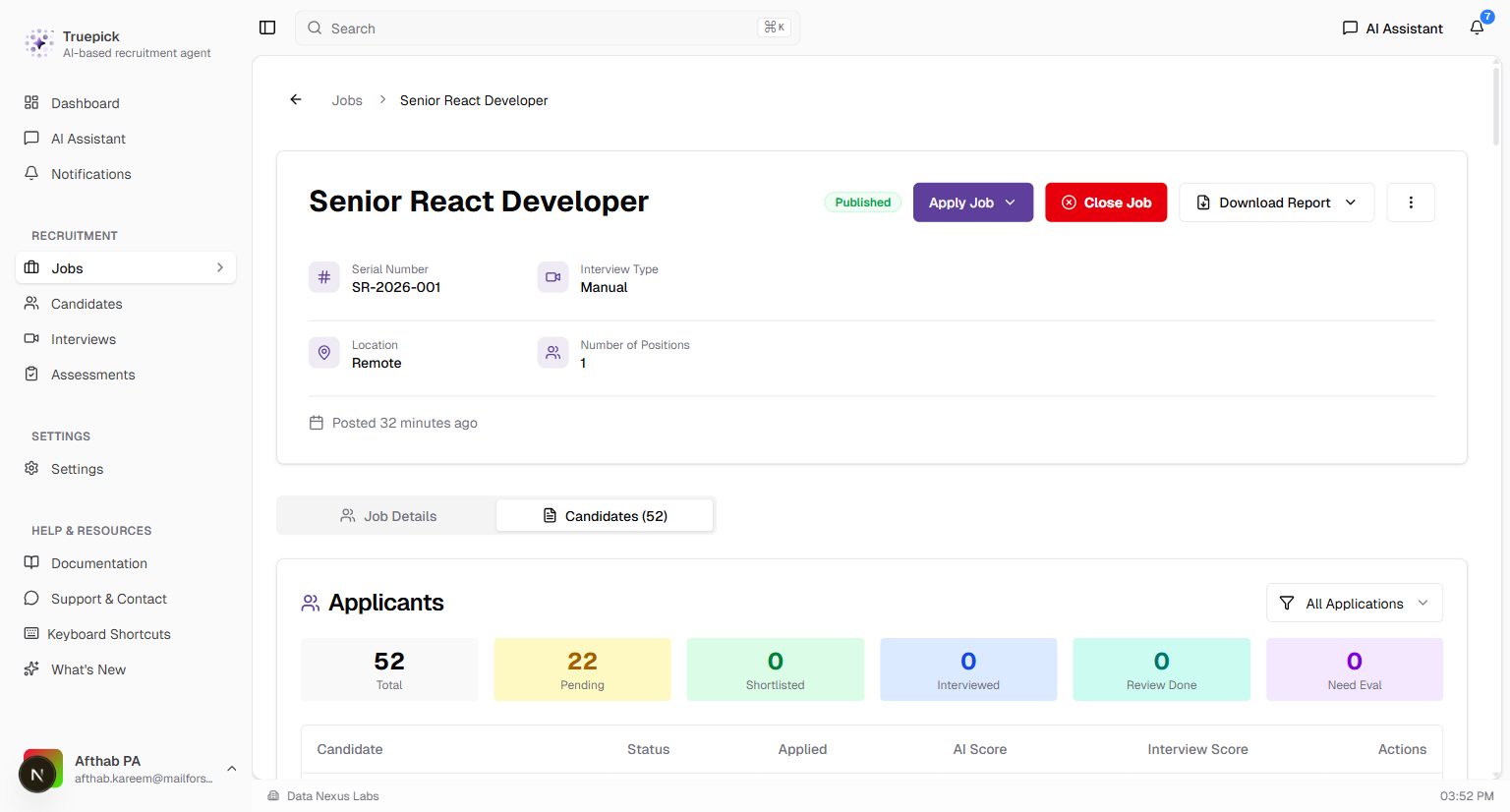
Job page showing 52 successfully uploaded candidates from bulk upload testing
Fix #2: Per-File Error Handling (No More All-or-Nothing Rejection)
Severity: Critical (P0)
Problem: If even one CV in a batch had an issue (corrupted file, encoding problem), the entire batch was rejected. Users had no way to identify which file caused the failure.
Fix: Replaced the single `try/catch` with `Promise.allSettled()` on the backend API. Each file is now validated and saved independently. The response includes individual results for every file — successful uploads proceed regardless of failures in other files.
Result: Valid CVs are processed and saved even when other files in the same batch fail. Each failed file returns its specific error reason. Inngest background processing is triggered only for successfully saved files.
Fix #3: Detailed Validation Messages for Every File
Severity: Critical (P0)
Problem: Failed files showed only a generic "failed" or "unsupported" status with no specific reason, making it impossible for users to understand or fix the issue.
Fix: Added comprehensive client-side validation with specific, actionable error messages for every failure type:
| File Issue | Error Message |
|---|---|
| Empty file (0 bytes) | "File is empty (0 bytes). Please upload a valid CV file." |
| Unsupported format | "File format '.xyz' is not supported. Please upload PDF or DOCX files." |
| Oversized file | "File exceeds maximum size of 5MB (X.XMB). Please compress or reduce file size." |
| Duplicate content | "Duplicate file detected (matches existing file content)." |
Server-side errors (save failures, encoding issues) are also returned per-file with specific error text.
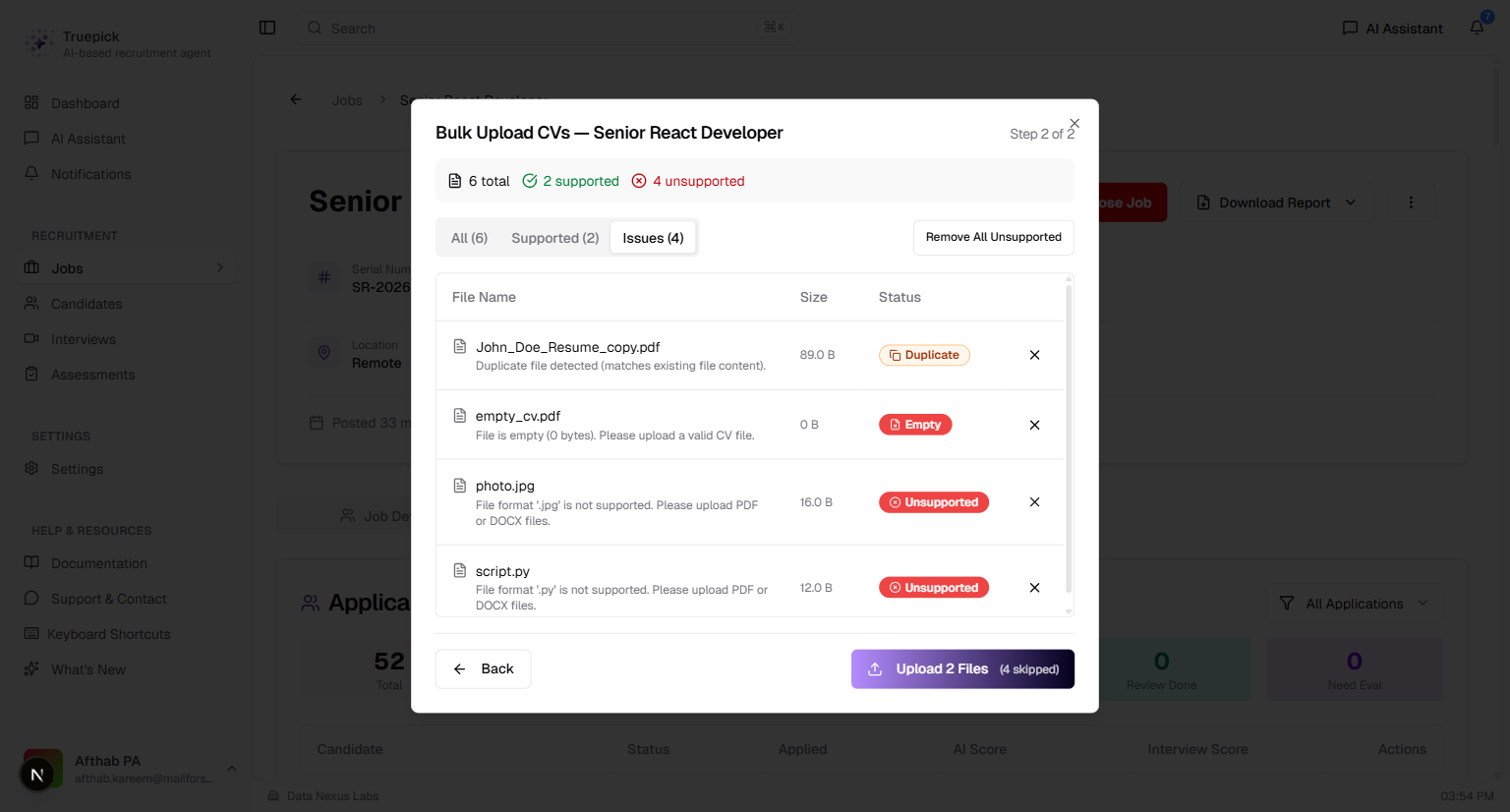
Issues tab showing filtered view of problematic files with specific validation messages for each
Fix #4: SHA-256 Duplicate Detection
Severity: Medium (P1)
Problem: The system allowed uploading the same CV multiple times without any detection, leading to duplicate candidates, wasted processing resources, and data integrity issues.
Fix: Implemented client-side SHA-256 hash-based duplicate detection. When files are added, their content hash is computed and compared against all previously added files. Duplicates are flagged instantly with an orange "Duplicate" badge and excluded from upload.
How it works:
1. Each file's content is hashed using SHA-256 via the Web Crypto API
2. Hashes are tracked in a `Set` across the current upload session
3. Files with matching hashes are marked as "Duplicate" with a clear message
4. Removing a file also removes its hash, allowing re-addition if needed
5. A toast notification informs: *"X duplicate file(s) detected and marked."*
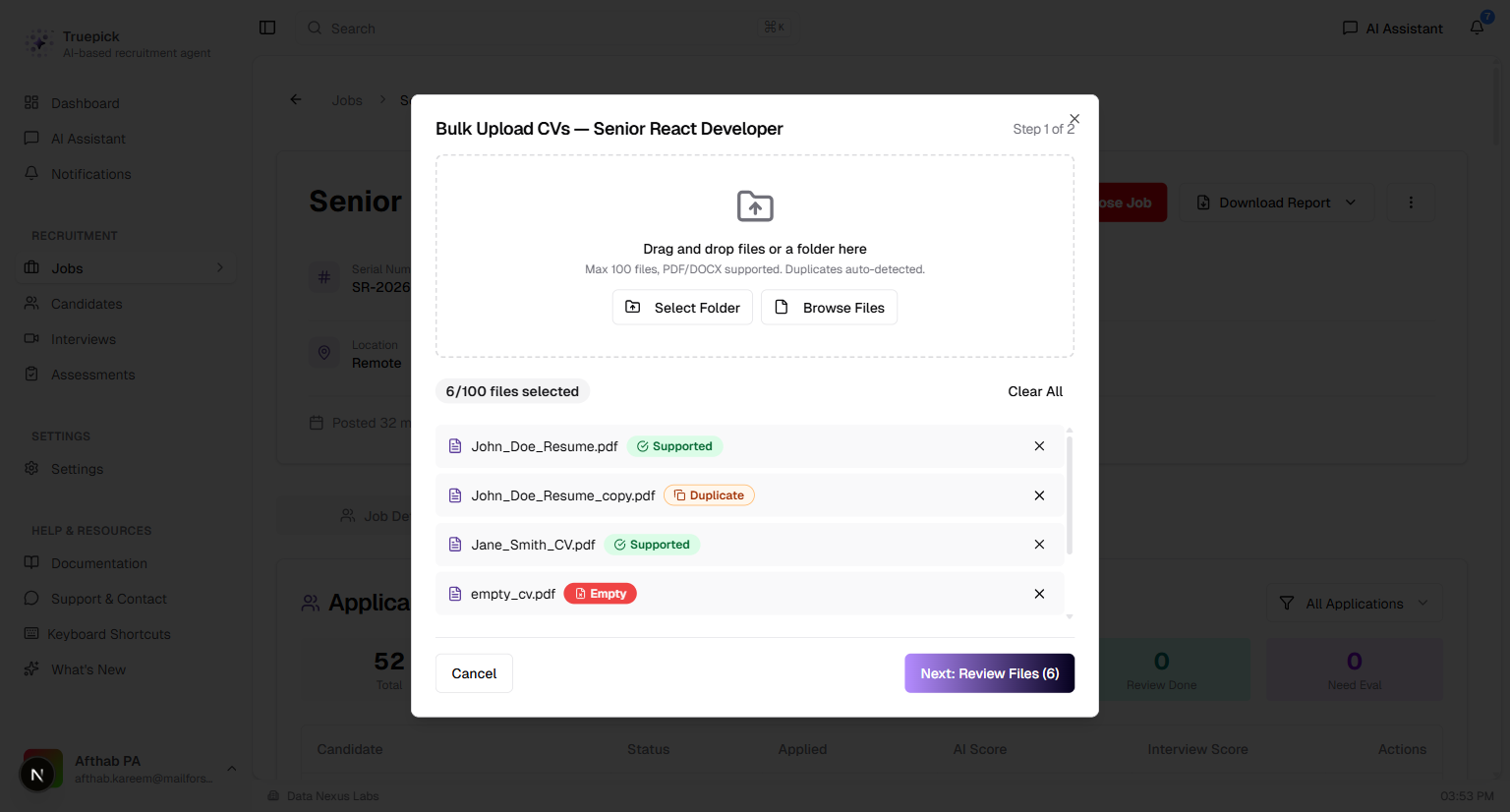
Step 1 showing files with color-coded validation badges — Supported (green), Duplicate (orange), and Empty (red)
Fix #5: Consistent Folder Upload Behavior
Severity: Medium (P1)
Problem: Drag-and-drop folder upload worked initially but exhibited inconsistent behavior on subsequent uploads — skipping files silently, failing to process new files, or showing stale state from previous sessions.
Fix: Three key improvements to state management:
1. Input value reset: File input elements are cleared (`value = ""`) after every file addition, ensuring the browser fires `onChange` even for the same folder
2. Full dialog reset: All state (files, hashes, progress, filters) is cleared via `resetDialog()` when the dialog closes
3. Hash cleanup on removal: Removing a file also removes its hash from tracking, preventing false duplicate detections
Result: Folder uploads work consistently every time. Re-selecting the same folder works correctly. No stale state between dialog sessions.
Fix #6: New "Browse Files" Button for Individual File Selection
Severity: Medium (P2)
Problem: Users could only upload entire folders via drag-and-drop or the folder picker. There was no way to select specific individual CV files, forcing users to organize files into folders first.
Fix: Added a dedicated "Browse Files" button alongside the existing "Select Folder" button. The new button opens a standard file picker dialog filtered to PDF and DOCX files, supporting multiple file selection. Files from both inputs are merged into the same queue with validation and duplicate detection applied.
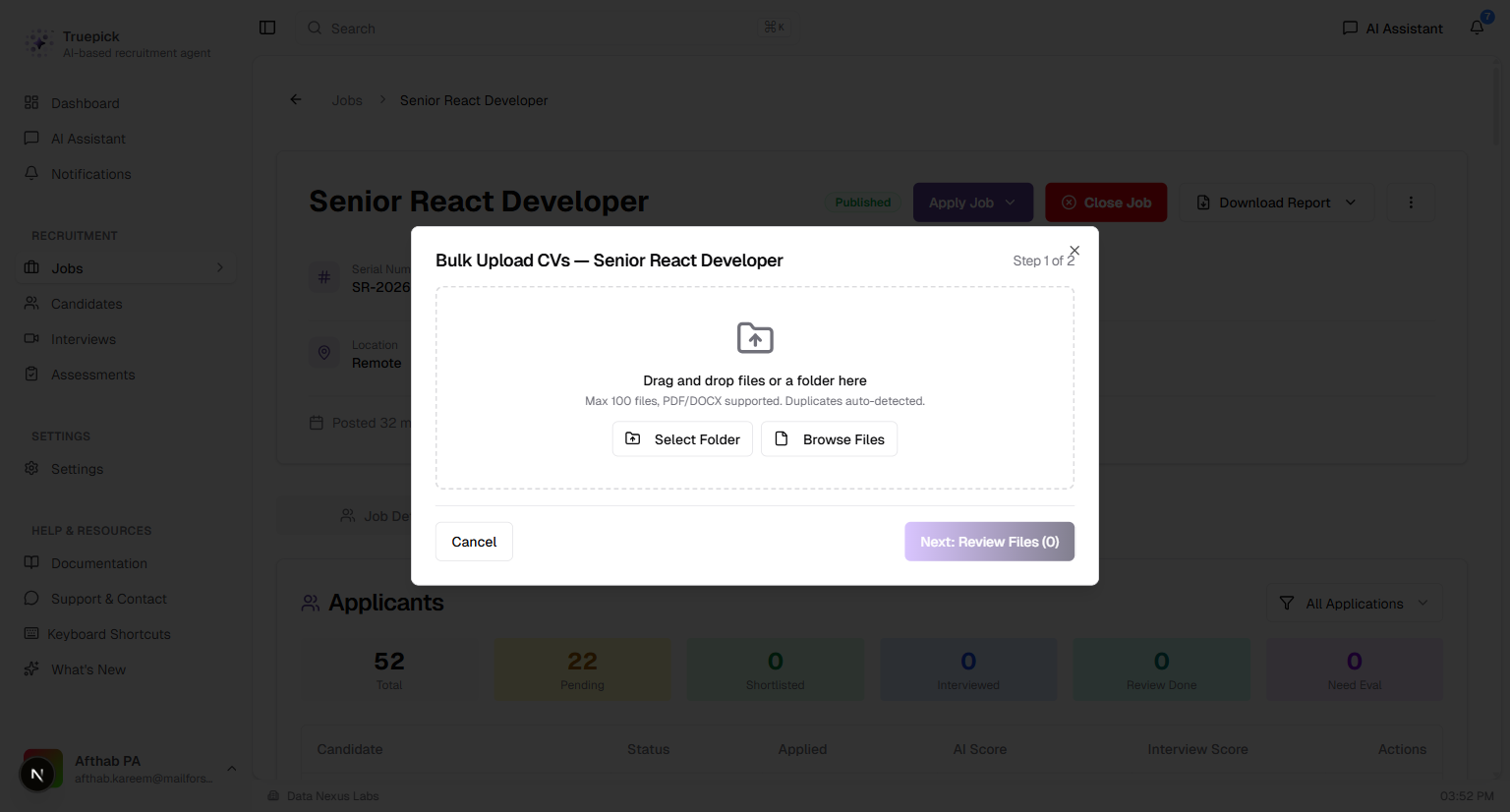
Step 1 showing the new "Browse Files" button alongside "Select Folder" in the drag-and-drop area
Three ways to add files:
- Drag and drop files or folders onto the drop zone
- Select Folder to pick an entire folder
- Browse Files to pick specific individual PDF/DOCX files
Preview & Upload Workflow
The two-step upload workflow now includes enhanced file validation and filtering:
Step 2: Review Files
- Summary bar showing total, supported, and unsupported file counts
- Filter tabs: All, Supported, Issues — to quickly focus on problematic files
- Each file shows: name, validation message, file size, and color-coded status badge
- "Remove All Unsupported" button for one-click cleanup
- Upload button shows exact count: *"Upload X Files (Y skipped)"*
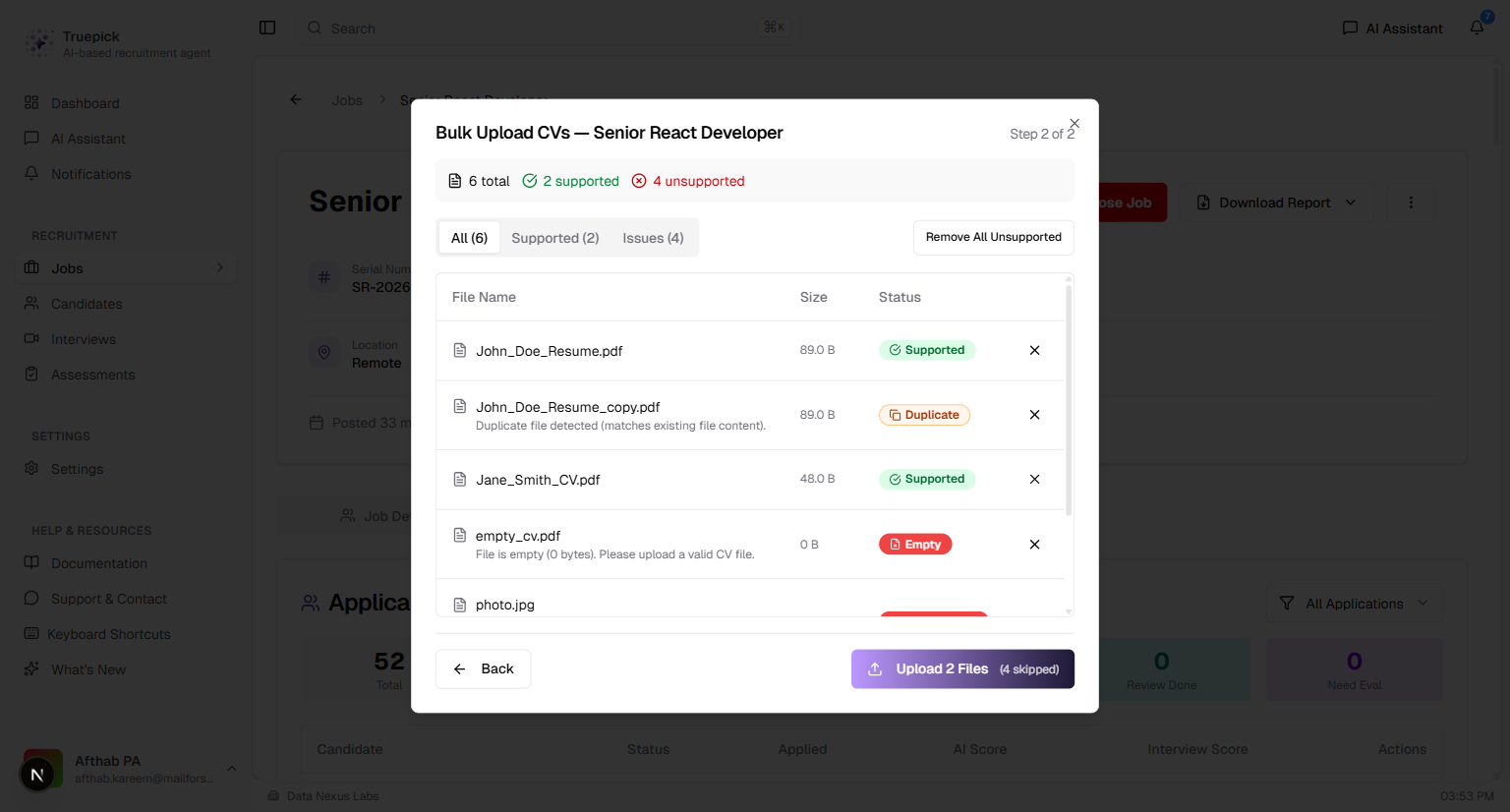
Step 2 preview showing file table with summary bar, filter tabs, validation messages, and upload action
Released on March 12, 2026
View all releases