Release Notes - Beta v0.12.2
Summary
This release introduces 6 new features and 6 improvements including OCR-based CV processing for scanned documents, live voice interviews powered by OpenAI Realtime, full Arabic (RTL) localization, candidate search and filtering, bulk candidate deletion, and real-time job tracking via Server-Sent Events.
What's New
- OCR-based CV processing with image PDF support and editable extracted data
- Live voice interviews using OpenAI Realtime model with ~300ms latency
- Salary expectation capture added to the interview flow
- Individual and bulk candidate deletion with cascade cleanup
- Full Arabic (RTL) language support across the entire application
- Search and filter candidates by name, location, and languages in the job applicants tab
Improvements
- Real-time job tracking via SSE replacing 2–10s polling intervals
- Editable AI Review scores and Interview Summary with full audit trail
- Interview question generation upgraded to Claude 4.5 Sonnet
- Dynamic app version display from release notes metadata
- Draggable Upload Center widget to prevent UI overlap
Infrastructure
- Inngest job failure handler to prevent stuck processing states
OCR-Based CV Processing
Parse Scanned CVs and Image-Based PDFs with Full Edit Support
The CV processing pipeline now includes OCR (Optical Character Recognition) to handle scanned documents and image-based PDFs that previously could not be parsed. A multi-strategy extraction approach ensures maximum compatibility across all CV formats.
Multi-Strategy Extraction Pipeline:
| Strategy | Use Case |
|---|---|
| pdf-parse | Standard text-based PDFs (fastest) |
| PDF.js | Complex layouts and formatting |
| Binary extraction | Direct text parsing from PDF structure |
| Tesseract OCR | Scanned/image-based PDFs (fallback) |
How It Works:
1. CV is uploaded and stored in S3
2. The system attempts text extraction using pdf-parse, then PDF.js, then binary extraction
3. If all text-based methods fail, the first page is converted to an image and processed with Tesseract OCR
4. Extracted text is parsed into structured candidate data using AI (Claude)
5. Candidate profile is created with all extracted fields available for review and editing
Editable Extracted Fields:
- Name, email, phone number, location
- LinkedIn URL, portfolio URL
- Professional summary
- Experience entries (title, company, duration, description)
- Education entries (degree, institution, year, field of study)
- Skills and languages
Supported Formats: PDF (text-based and scanned/image), DOCX
Realtime Interview Model
Live Voice Interviews Powered by OpenAI Realtime
Interviews are now powered by OpenAI's Realtime model (`gpt-realtime-1.5`), enabling natural, low-latency voice conversations. This replaces the previous multi-component pipeline (separate VAD + STT + LLM + TTS) with a single unified speech-to-speech model.
Key Capabilities:
- ~300ms latency — down from 700–1000ms with the previous pipeline
- Semantic Voice Activity Detection (VAD) — detects when the speaker finishes naturally, with configurable eagerness
- Built-in Speech-to-Text — gpt-4o-transcribe model integrated for real-time transcription
- Natural TTS — high-quality neural voice output with lip-sync support
- Interrupt support — candidates can interrupt the AI interviewer naturally
Interview Modes:
1. Candidate Mode (default): AI acts as the interviewer, the human is the candidate
2. Interviewer Practice Mode: AI acts as a realistic candidate with a full persona — experience level, salary expectations, communication style, strengths, and weaknesses — so recruiters can practice interviewing skills
Optional Avatar Integration:
- Tavus avatar support for visual video interviews
- Real-time lip-sync with the "marin" voice output
- Low-latency optimized connection settings
Interview Flow:
1. Parse interview metadata and generate mode-specific prompts
2. Connect to LiveKit room and wait for participant
3. Create interview agent with instructions and semantic VAD
4. Initialize avatar session (if configured)
5. Start real-time transcript capture with speaker identification
6. Deliver interview greeting and begin conversation
Salary Expectation Capture
Collect Candidate Salary Expectations During Interviews
A new salary expectation question has been added as Step 5 in the 6-step AI interview flow. The question is asked conversationally after job-specific questions and before the closing, ensuring a natural flow.
Interview Structure:
1. Warm Welcome & Greeting
2. Get to Know the Candidate
3. Understand Their Interest
4. Job-Specific Questions
5. Salary Expectations (new)
6. Warm Closing & Next Steps
How It Works:
- The AI interviewer asks about salary expectations using varied, natural phrasing — for example: *"By the way, do you have a salary range in mind for this role?"* or *"What are you looking at in terms of compensation?"*
- The candidate's verbal response is transcribed in real-time and stored as part of the full interview transcript
- The AI acknowledges the response briefly without negotiation or judgment
- Salary data is available post-interview for analysis alongside the full transcript
Candidate Deletion
Individual and Bulk Delete for Candidate Applications
Recruiters can now delete candidate applications individually or in bulk, with proper cascade cleanup and confirmation safeguards.
Individual Deletion:
- Available via the three-dot menu on each applicant row
- Deletes the candidate record, all associated applications, and removes photo files from storage
- Confirmation dialog before permanent deletion
Bulk Deletion:
- Toggle "Delete Mode" to enable multi-select checkboxes on the applicants table
- "Select All" checkbox to toggle all visible applications
- "Delete Selected" button processes up to 200 applications per batch
- Confirmation dialog showing the count of applications to be deleted
- Toast notification on success or failure
Safety Features:
- Confirmation dialog required before any deletion
- Cascade deletion maintains database referential integrity
- Multi-tenancy enforcement — only company-owned candidates can be deleted
- Automatic cleanup of associated photo files in S3
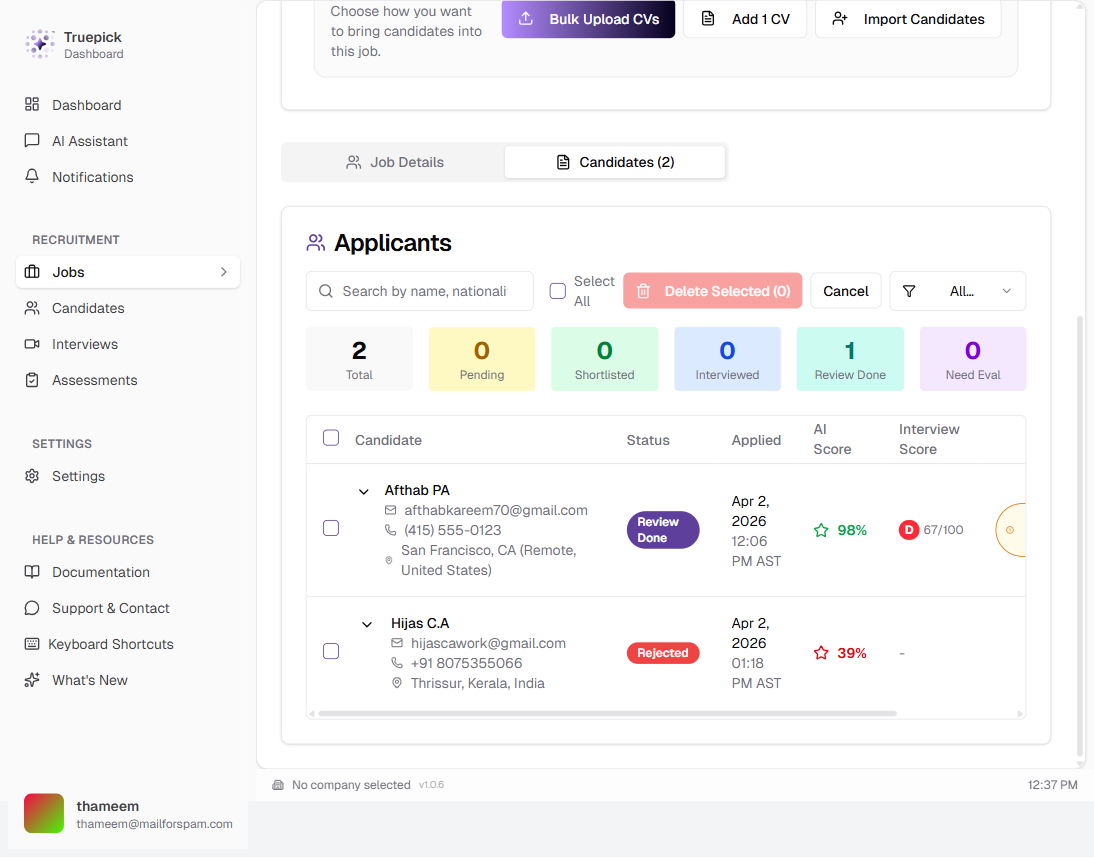
Job applicants table in delete mode with multi-select checkboxes and "Delete Selected" action
Arabic Language Support (RTL)
Full Arabic Localization with Right-to-Left Layout
The entire application now supports Arabic with complete right-to-left (RTL) layout, covering all UI elements, navigation, forms, and content areas.
Scope:
- 2,771 translated strings covering every UI element — navigation, authentication, job management, candidate profiles, interviews, assessments, settings, notifications, and error messages
- Dynamic RTL switching — the `<html>` direction attribute toggles automatically based on locale
- Native Arabic typography — Noto Sans Arabic font loaded from Google Fonts for proper rendering
- Locale-aware routing — URL structure supports `[locale]` parameter (e.g., `/ar/jobs`, `/en/jobs`)
Supported Locales:
| Locale | Direction | Font |
|---|---|---|
| English (en) | LTR | Geist Sans |
| Arabic (ar) | RTL | Noto Sans Arabic |
Technical Implementation:
- Built on `next-intl` for server and client-side translations
- `LocaleHtmlAttrs` component dynamically sets `dir` attribute after hydration
- Complete message files for both languages with 1:1 key parity
- Seamless switching without page reload
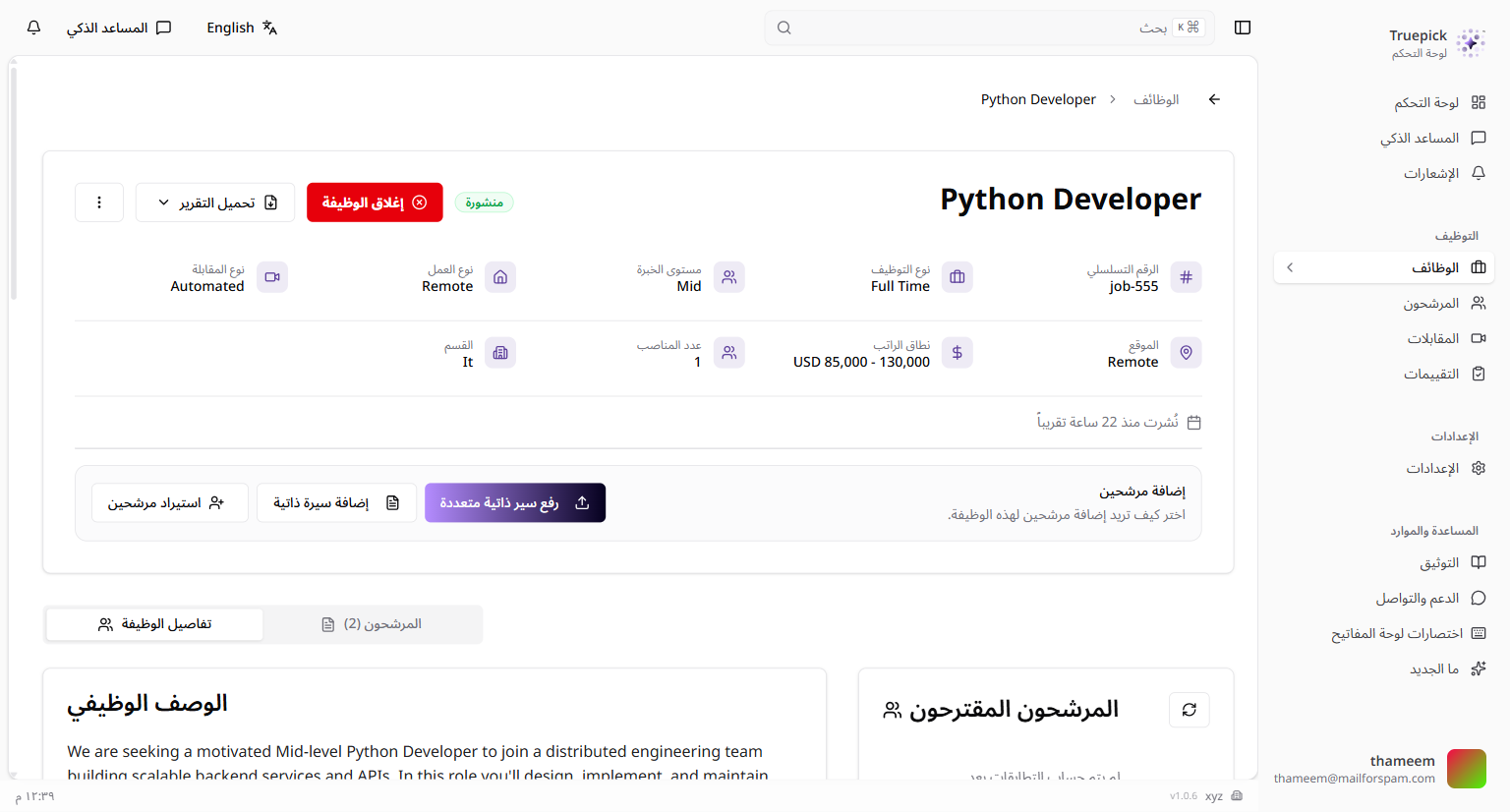
Application interface in Arabic with full RTL layout, Arabic navigation, and properly mirrored UI elements
Search & Filter in Candidate Tab
Find Candidates by Name, Location, and Language with Status Filtering
The job applicants tab now includes a real-time search bar and status filter dropdown, making it easy to find specific candidates in large applicant pools.
Search Capabilities:
- Full-text search across candidate name, location, and languages
- Real-time filtering with 500ms debounce for smooth performance
- Case-insensitive partial string matching
Status Filter:
Filter applicants by any of 13 statuses:
- All, Pending, Reviewing, Awaiting Assessment, Assessment Completed, Shortlisted, Interview Scheduled, Interviewed, Awaiting Evaluation, Review Done, Offered, Rejected, Withdrawn
Smart Sorting:
- Results automatically sorted by AI review score (highest first)
- Secondary sort by application date (newest first)
- Candidates without scores appear at the end
Quick Stats Grid:
A statistics bar displays counts for key statuses at a glance — Total, Pending, Shortlisted, Interviewed, Review Done, and Awaiting Evaluation.
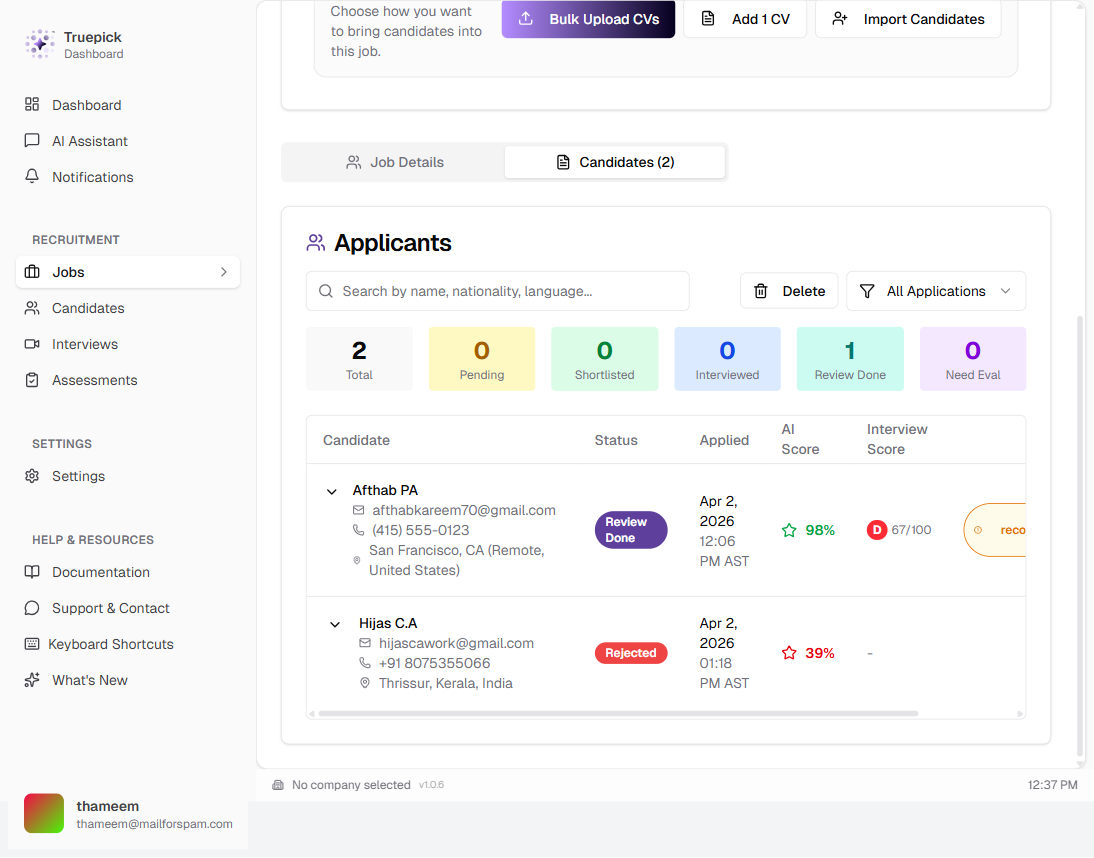
Job applicants tab with search bar, status filter dropdown, and quick stats grid
Real-Time Job Tracking (SSE)
Instant Updates Replace Polling Across the Application
All job tracking components have been upgraded from periodic polling (2–10 second intervals) to Server-Sent Events (SSE), delivering instant updates when job states change.
Components Upgraded:
| Component | Before | After |
|---|---|---|
| Upload Center | 2s polling | Instant SSE push |
| Candidate Scan Progress | 5s polling | Real-time progress |
| Upload History Dialog | 10s polling | Live status updates |
| Job Applicants List | 10s polling | Instant refresh on change |
| Notifications | Polling | Real-time toast alerts |
How It Works:
- Components establish a persistent SSE connection to `/api/job-tracking/ws/{userId}`
- The server pushes `job_update` events immediately when jobs transition between states (pending, processing, completed, failed)
- Automatic reconnection with exponential backoff (base: 2s, max: 30s)
- Graceful fallback to database polling when SSE is unavailable
Connection Management:
- Shared poller per user — prevents database overload
- Per-user connection limit (5 max) with automatic eviction
- Global circuit breaker (200 max total connections)
- Keep-alive pings every 30 seconds to detect dead connections
- 1-hour TTL with automatic cleanup
Benefits:
- Instant feedback when CVs finish processing or jobs complete
- Significantly reduced database load compared to polling
- Better user experience with no visible delay between state changes
Editable AI Review & Interview Summary
Manually Adjust AI-Generated Scores and Evaluations
AI-generated candidate evaluations can now be edited by the job owner, allowing manual adjustments to scores, grades, and recommendations with a full audit trail.
Editable Fields in AI Interview Summary:
- Overall Evaluation: Score (0–100 slider), hiring grade (A+ to F), recommendation (hire/maybe/not hire), assessment text
- Detailed Scores (each with 0–100 slider + details): Technical Skills, Experience Relevance, Interview Performance, Cultural Fit, Growth Potential
- Lists: Key Strengths, Areas of Concern, Interview Highlights, Recommendation Reasoning
Editable Fields in AI Review Summary:
- Overall review score (0–100 slider)
- Recommendation text
- Key Strengths and Areas of Concern
How It Works:
1. Click the "Edit" button to open the edit modal
2. Adjust scores using sliders, modify text in textareas, select grades from dropdowns
3. Click "Save Changes" to submit updates via PATCH API
4. Changes are logged with full audit trail (before/after values, timestamp, user)
Authorization: Only the job owner can edit AI evaluations. All changes are logged with `createAuditLog()` for compliance.
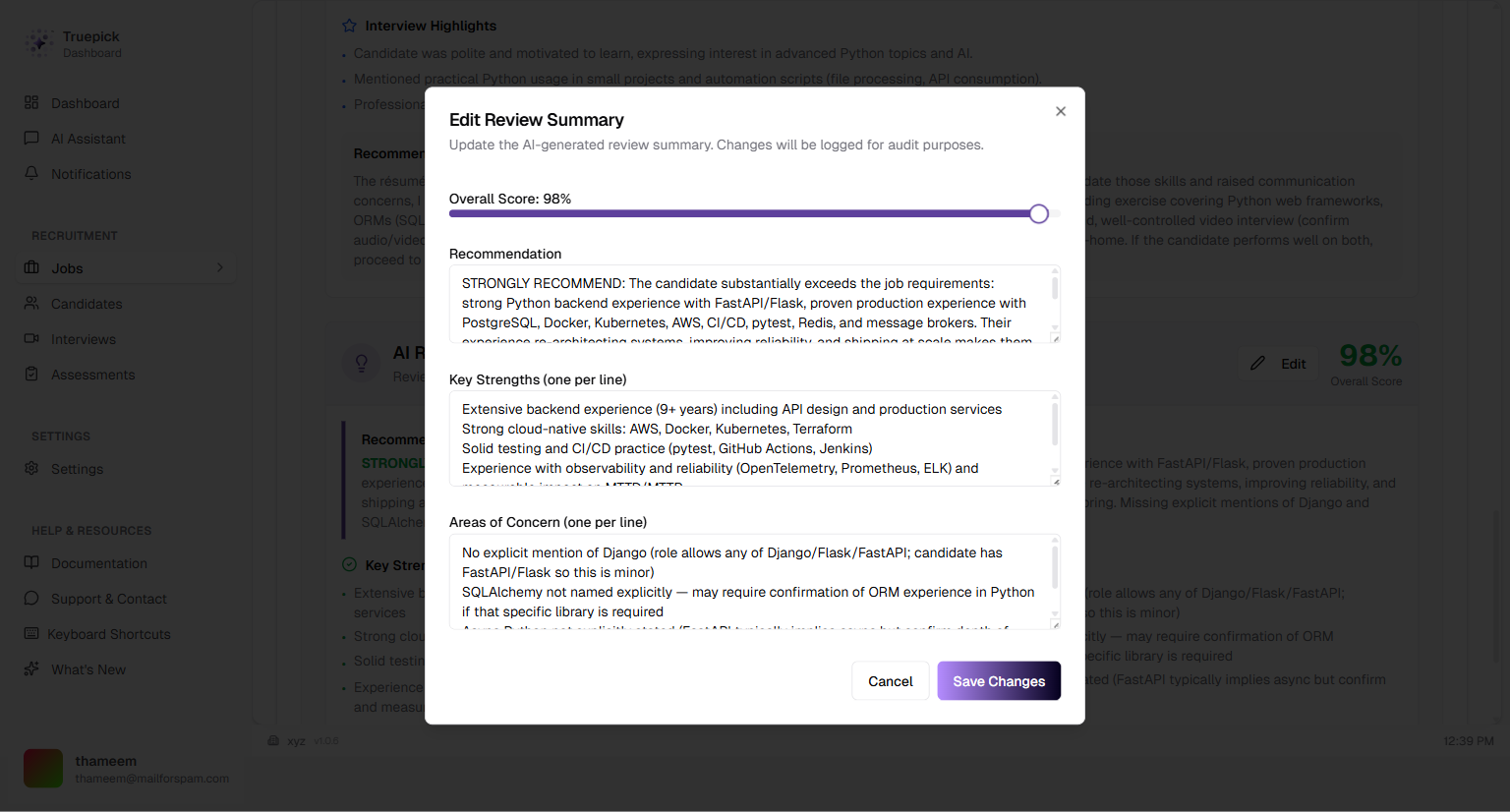
Edit modal for AI Review Summary showing score slider, recommendation text, and editable strengths/concerns
Interview Model Upgrade
Claude 4.5 Sonnet for Higher-Quality Interview Questions
Interview question generation has been upgraded from the previous model to Claude 4.5 Sonnet via OpenRouter, producing more context-aware and structured interview questions.
What Changed:
- Model: `anthropic/claude-3.5-sonnet` → Claude 4.5 Sonnet
- Default question count: 25 questions per assessment
- Temperature: 0.7 for balanced creativity and consistency
Updated Question Schema:
Each generated question includes:
- Unique ID, question text, and example answer with key evaluation points
- Category: technical, behavioral, soft skills, creative, or administrative
- Difficulty: intermediate or complex
- Score weight: 1–10 importance rating
Benefits:
- Better alignment with job requirements and candidate skills
- More diverse question distribution across categories
- Higher-quality example answers for evaluators
- Improved structured JSON output reliability
App Version Display
Dynamic Version Number in the UI
The application version is now displayed dynamically in the UI, pulled from the latest release notes metadata. A REST API endpoint (`GET /api/version`) provides the current version for any client.
How It Works:
- Reads all release notes markdown files from `/public/release-notes/`
- Parses YAML frontmatter to extract version and release date
- Sorts by date and returns the most recent version
- No hardcoded version numbers — automatically reflects the latest release
Draggable Upload Center Widget
Move the Upload Widget to Prevent UI Overlap
The Upload Center widget is now draggable, allowing users to reposition it anywhere on the screen. This resolves the issue where the widget would cover the "Create Job" or "Publish Job" buttons.
How It Works:
- Click and drag the widget header to move it to any position on screen
- Widget stays within viewport bounds (cannot be dragged off-screen)
- Cursor changes to grab/grabbing during drag interaction
- Position resets to the default (bottom-right corner) when upload batches are cleared
Drag Handle:
- The full-width header bar with a grip icon acts as the drag trigger
- Buttons within the widget (close, expand, collapse) remain clickable without triggering a drag
- Works in both expanded and collapsed widget states
Inngest Job Failure Handling
Automatic Failure Detection Prevents Stuck Jobs
An `onFailure` handler has been added to the base Inngest job configuration, ensuring that jobs are automatically marked as failed in the database when all retry attempts are exhausted.
Problem Solved:
Without this handler, jobs could remain in a perpetual "processing" state if all retries failed silently, leaving users with no feedback and no way to identify the issue.
How It Works:
1. Each Inngest job is configured with a retry count (default: 3 attempts)
2. If all retries are exhausted, the `onFailure` handler fires automatically
3. The handler updates the `JobTracking` table with status `'failed'` and an error message
4. A real-time broadcast notifies the user via SSE so the failure appears immediately in the UI
5. Fallback broadcasts ensure notifications are sent even if the database update fails
Benefits:
- No more stuck "processing" jobs — every job reaches a terminal state
- Users see failures immediately via real-time SSE notifications
- Error messages are preserved for debugging and troubleshooting
Released on April 03, 2026
View all releases