Release Notes - Beta v0.14
Summary
This release focuses on the public candidate experience, AI interview configurability, and shortlisting workflows. Highlights include a brand-new guest apply flow (candidates can now apply without an account), a candidate status tracking page via secure magic link, a redesigned candidate comparison that evaluates applicants against the job description, per-job AI interview behavior settings (language, personality, follow-up depth), a public publish toggle on every job, sortable job listings, and Push-to-Talk mode for AI interviews.
What's New
- Guest apply — candidates apply to public jobs without signing up; email one-time-code verification, privacy consent, and invisible CAPTCHA built in
- Candidate status tracking via magic link — secure link emailed after verification opens a personalised status page with full timeline and active-step cards for pending assessments or scheduled interviews, no login needed
- Public job controls + new landing page — explicit *Public* toggle on every job so recruiters decide what's visible, a public job board with search, and a brand-new landing page (value proposition, how-it-works, integrations, FAQ, pricing teaser)
- Pre-interview consent screen + Push-to-Talk mode — candidates see what to expect and a recording notice before starting, and can pick hands-free or Push-to-Talk (hold Space) with mid-interview switching
- Per-job AI interview settings — preferred language, number of questions (default raised from 2 to 5), interviewer personality, and follow-up depth configurable on every job
- Redesigned candidate comparison + CV re-upload — pricing-table layout scoring candidates against the actual JD; re-upload an applicant's CV to trigger fresh AI screening with a full history viewer preserving every past review
Improvements
- Bulk-delete now protects offered candidates — the checkbox is hidden and disabled with a tooltip explaining why
- Decision email copy updated to "Offer Extended" / "Congratulations", and status-change emails now fire reliably after assessment completion (previously silently missed)
- Scanned / photo-based PDFs now read reliably via a three-stage fallback (text → OCR → vision); Arabic + English OCR supported
- Arabic interviews start in Arabic from the very first word — no English slip
- Live interview polish — AI greeting plays cleanly, transcript renders in correct order, no more ghost bubbles, and camera toggle removed
- Regenerate Interview Link now actually sends the email and shows the sent timestamp; public job share page renders correctly in OS dark mode
Security & Reliability
- Signed magic tracking tokens — server-validated before any application data loads, 90-day expiry, per-application revocation
- Rate-limited token generation to prevent token-guessing abuse
- CAPTCHA + email OTP on the guest apply endpoint to block spam and bots
- Privacy consent versioning — stored per application so consent records remain auditable as the notice evolves
- Single active session per interview — session cookie binds an interview to one browser; duplicate attempts are rejected cleanly
- Transactional re-evaluation — CV re-upload, review archive, and status recompute run as one atomic operation; any failure rolls back cleanly
- Transactional regenerate-interview-link — email send plus status reset and archive are all-or-nothing
- Automatic cleanup of unverified pending applications
Guest Apply — No Account Needed
Candidates Apply to Public Jobs Without Signing Up
Truepick's public job board now accepts applications without any sign-up. Anyone can browse open roles, click Apply, upload their CV, and be done in under a minute.
How It Works:
1. Candidate visits the public job board
2. Picks a role and reads the full job description
3. Fills in name, email, optional phone, uploads a CV, optionally writes a cover letter
4. Accepts the privacy notice and passes a quiet CAPTCHA check
5. Receives a one-time code by email and confirms the application
Safeguards Built In:
| Safeguard | What It Does |
|---|---|
| Privacy consent | Versioned acknowledgement is stored per-application for audit |
| CAPTCHA | Invisible bot-check protects the public apply endpoint |
| Email OTP verification | Applications stay in "Pending Email Verification" until the candidate confirms |
| Duplicate-application detection | The same candidate can't apply twice to the same job |
| Pending cleanup | Unverified applications are automatically cleared out |
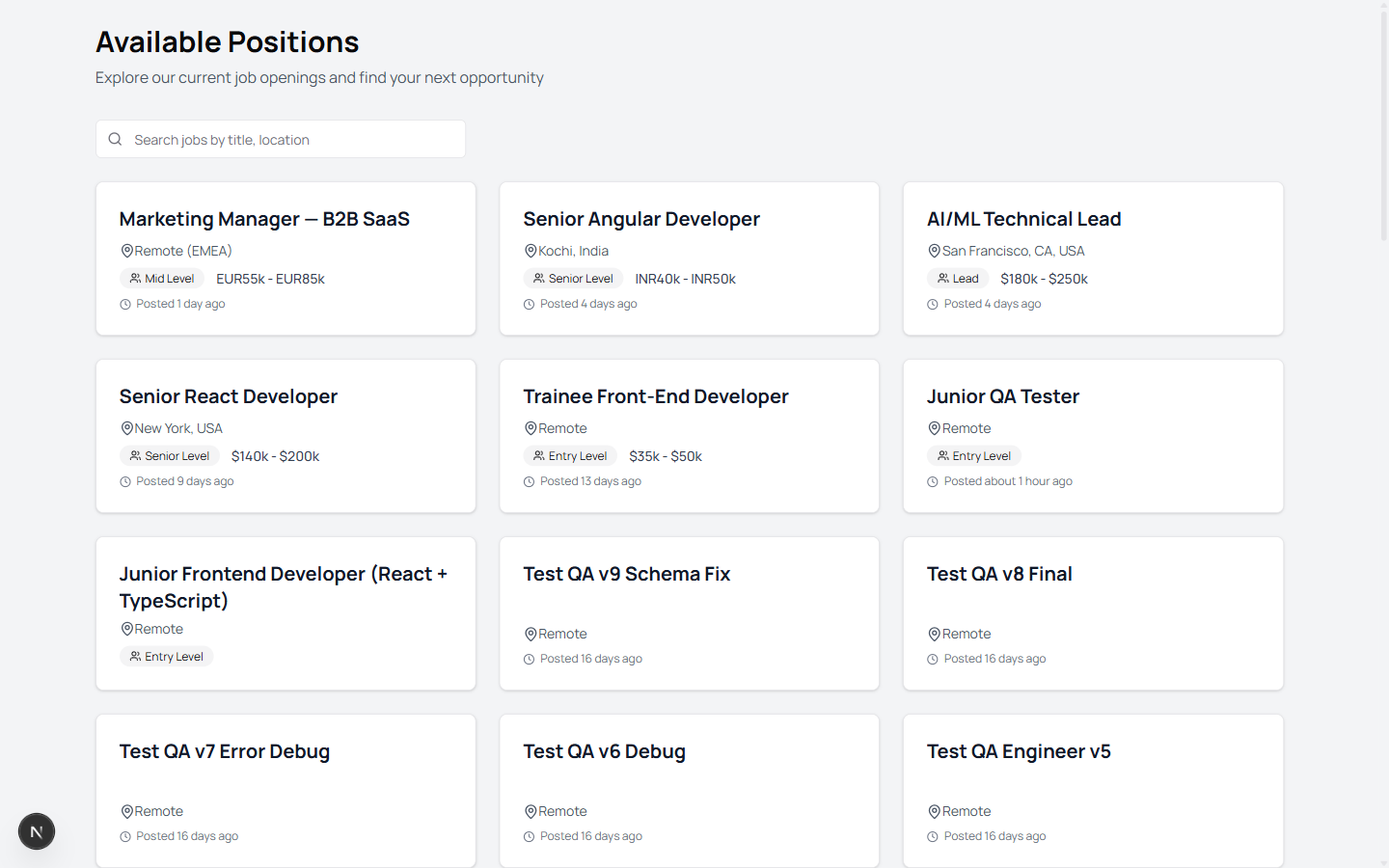
Public job board showing all open positions with search by title or location
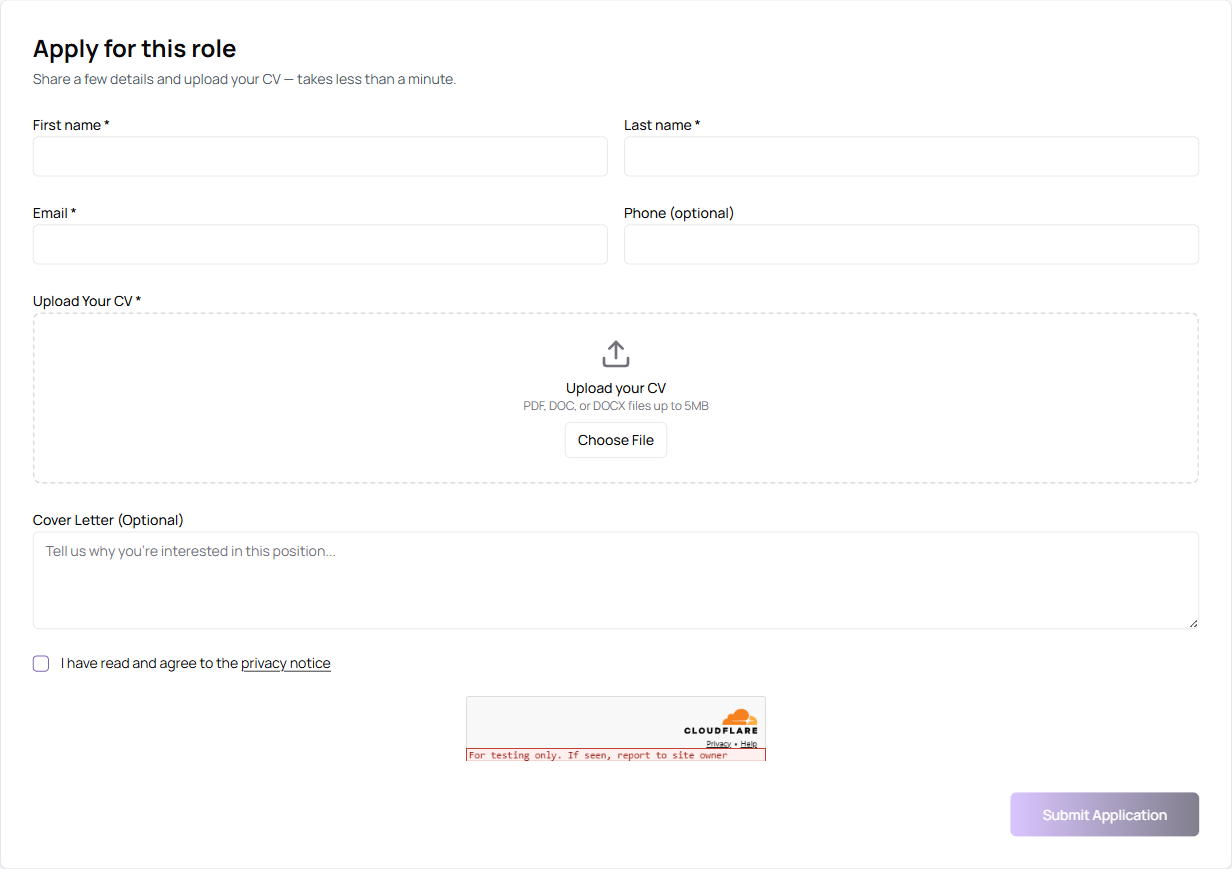
Apply form below the job description — name, email, phone, CV upload, cover letter, privacy consent, and CAPTCHA
Candidate Status Tracking via Magic Link
Candidates Track Their Application Without a Password
After every confirmed application, Truepick emails the candidate a secure magic tracking link. One click opens a personalised status page that stays current as the recruiter moves the candidate through the pipeline.
What Candidates See:
- A friendly status headline that matches where they are (e.g. *"Offer Extended"*, *"Not Selected"*, *"Interview Scheduled"*, *"Assessment Pending"*)
- A What's next panel with a specific next step ("Check your email for offer details", "Take your assessment", etc.)
- A visual timeline of every event in their journey — application received, profile reviewed, shortlisted, assessment assigned, assessment completed, interview invitation sent, evaluation completed, decision made — each with a timestamp
- Their job details (title, company, location, employment type) and submission date
- Active-step cards — an amber "Take Assessment" card if an assessment is pending, a blue "Join Interview" card if an interview is scheduled
What Candidates Don't See:
- Internal stage names like *pending*, *reviewing*, *awaiting_evaluation* — candidates see polished, human labels instead
- Their internal score, interviewer notes, or any other recruiter-only data
Security:
| Protection | How It Works |
|---|---|
| Signed token | 64-char cryptographically random token stored per application |
| Server-side validation | Token is checked before any data is loaded — no PII in the URL |
| 90-day expiry | Tokens automatically expire after 90 days |
| Revocable | Recruiters can revoke a token per application if needed |
| Rate-limited | Max 10 generations per application per hour to prevent abuse |
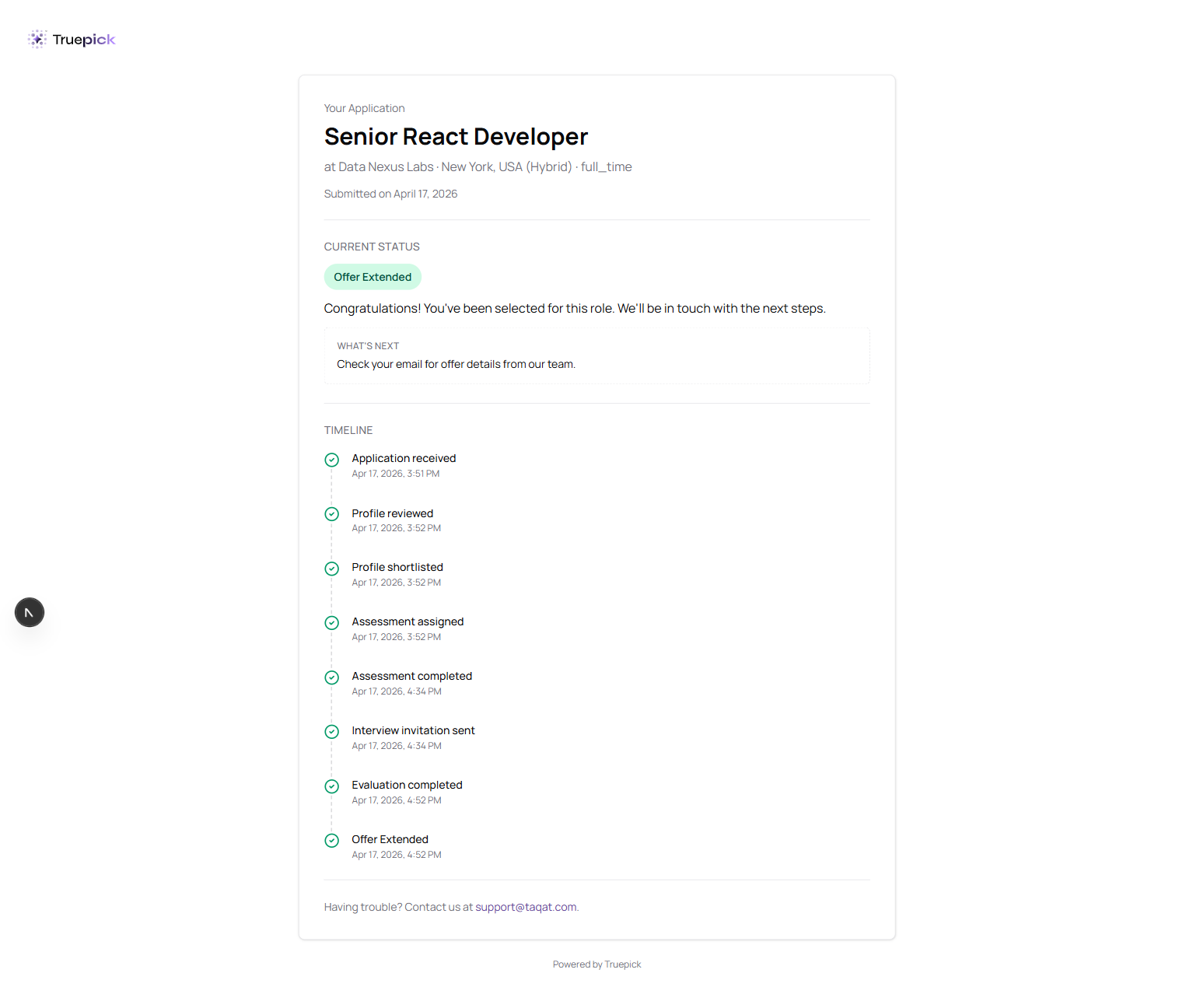
Candidate status page opened via magic link — showing Offer Extended status, What's next panel, and the full event timeline
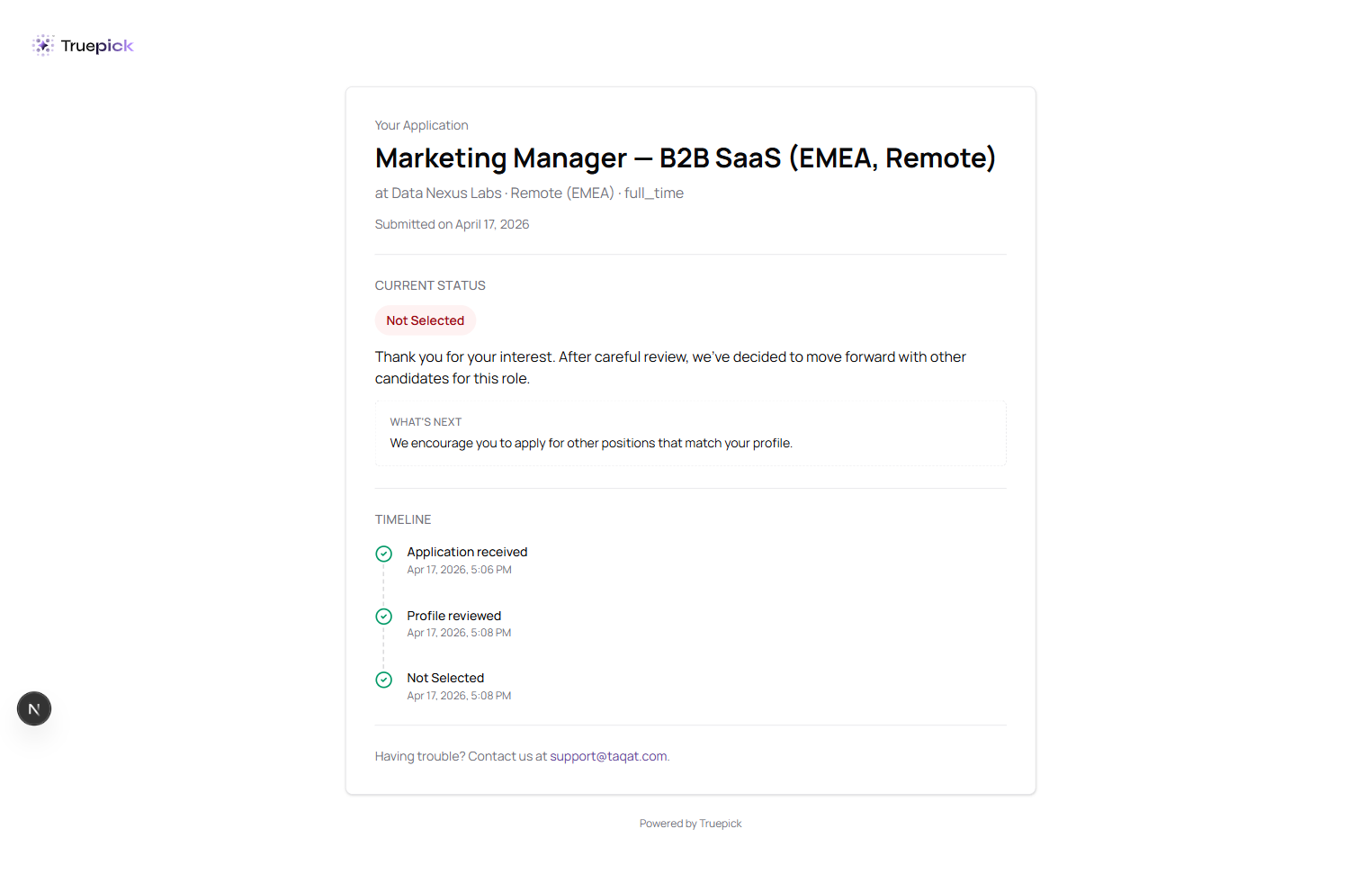
Same page for a rejected candidate — respectful "Not Selected" status with an encouraging next-step message
Explicit Public Publish Toggle on Jobs
You Decide Exactly Which Jobs Appear on the Public Board
Every job now has a dedicated Public toggle next to its Published status. Flip it on and the job appears on the public job board for anyone to apply to. Flip it off and the job stays internal — still posted inside Truepick, still accepting applications via direct link or embed, but hidden from the public website.
Why It Matters:
- Recruiters can publish a job inside the ATS *without* exposing it to the public careers page
- Confidential roles stay confidential
- Draft-quality content can't accidentally leak to candidates
- Filled roles can be hidden immediately without closing them
Smart Guardrails:
- The toggle is disabled on draft jobs (with a *"Publish first"* hint) — you can't make a draft public
- Un-publishing a job with active applications shows a warning toast with the exact count, so you know what you're hiding
- Every toggle change is audit-logged
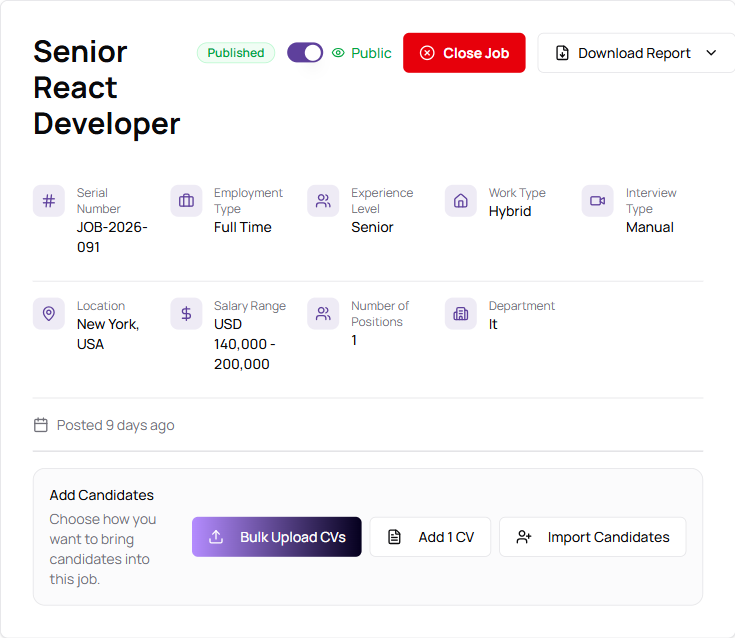
Job detail header with the new Public toggle next to the Published status badge
Brand-New Landing Page
A Cleaner, More Direct Marketing Site
Truepick's public landing page was rebuilt from scratch for clarity and search performance.
What's On It:
- A direct hero message with a single primary call to action (Book a Demo)
- A visual How It Works walkthrough in four steps — from job creation to offer letter
- An Everything you need to hire feature grid (AI Video Interview, Smart Resume Analysis, AI Job Creation, Custom Assessments, Analytics Dashboard, Gmail Integration, Offer Letters)
- A candidate-experience comparison — Traditional Hiring vs With Truepick
- An Integrations section (Google Calendar, Google Meet, Gmail, Microsoft Teams, Zoom)
- A Plans for every team pricing overview (Starter, Professional, Enterprise)
- A Frequently asked questions section covering the most common recruitment questions
- A Trusted by growing teams social-proof band with key metrics and trust badges
Under the Hood (That You'll Notice):
- Faster first paint — hero image optimised with priority loading
- Opens correctly in every locale with English and Arabic language alternates
- All public pages force light theme so dark-mode visitors always see the intended design
- Clean, polished footer with semantic navigation and contact info
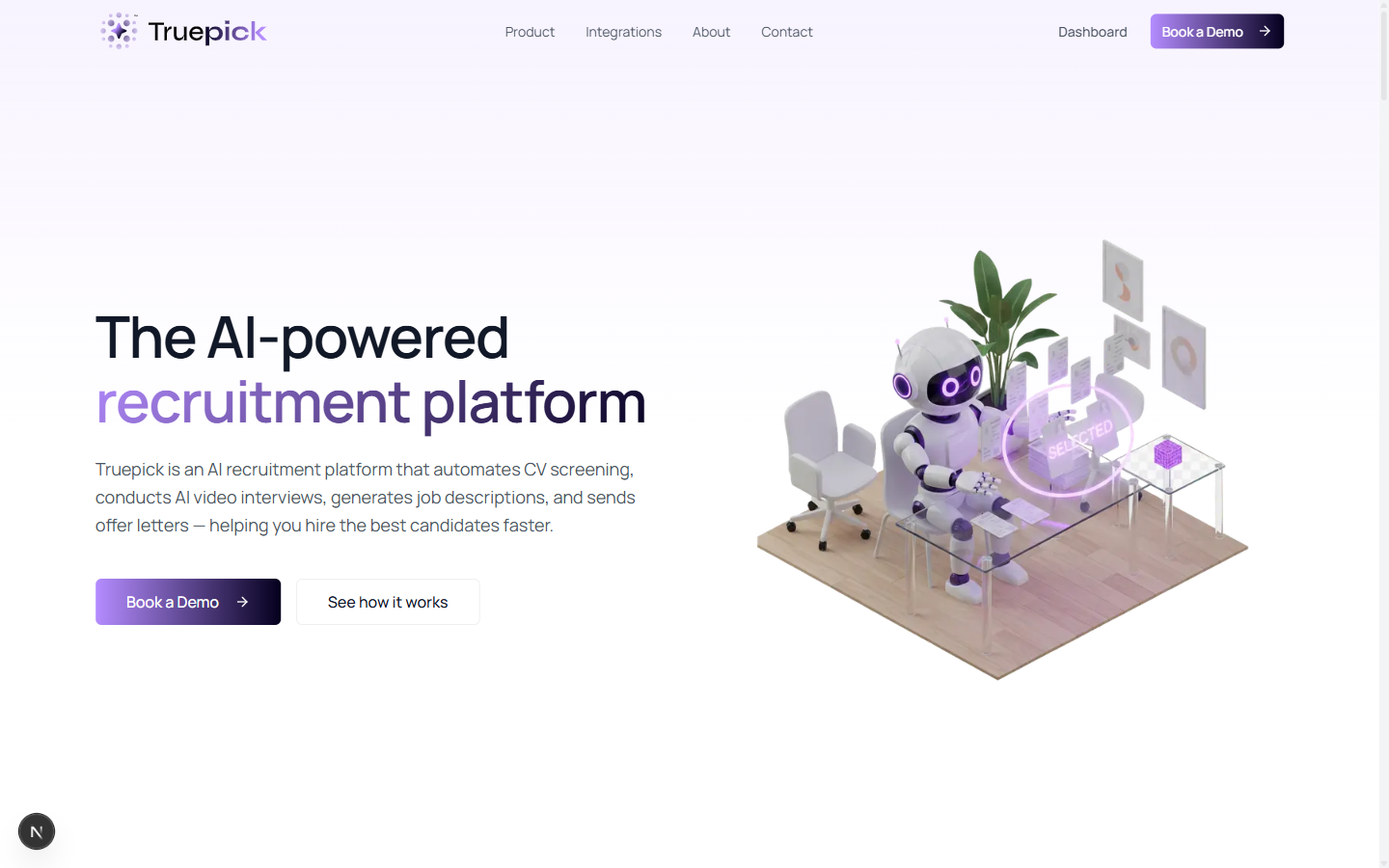
Redesigned landing page hero with a direct value proposition and illustrated AI interviewer
Pre-Interview Consent Screen
A Clear Brief Before the AI Interview Begins
Candidates now see a dedicated consent screen before joining the live AI interview. They can't skip it — the Start Interview button is disabled until the acceptance box is ticked.
What's on the Screen:
What to Expect
- You'll be interviewed by our AI assistant over voice and text
- The session typically takes 30–45 minutes
- Your video, audio, and responses will be recorded and evaluated
- You will be evaluated fairly and objectively against the role
Prepare Your Environment
- Stable internet connection
- Quiet, well-lit location where you won't be interrupted
- Laptop or desktop with a working camera and microphone
- Up-to-date Chrome, Edge, or Safari browser
- Resume and relevant notes nearby
How You'd Like to Speak
- Pick Hands-free or Push-to-Talk before the interview starts (more on that below)
Privacy & Recording
- Clear disclosure that the interview is recorded, transcribed, and analysed
Consent acceptance is stamped on the application the first time the candidate accepts — creating a stable audit record.
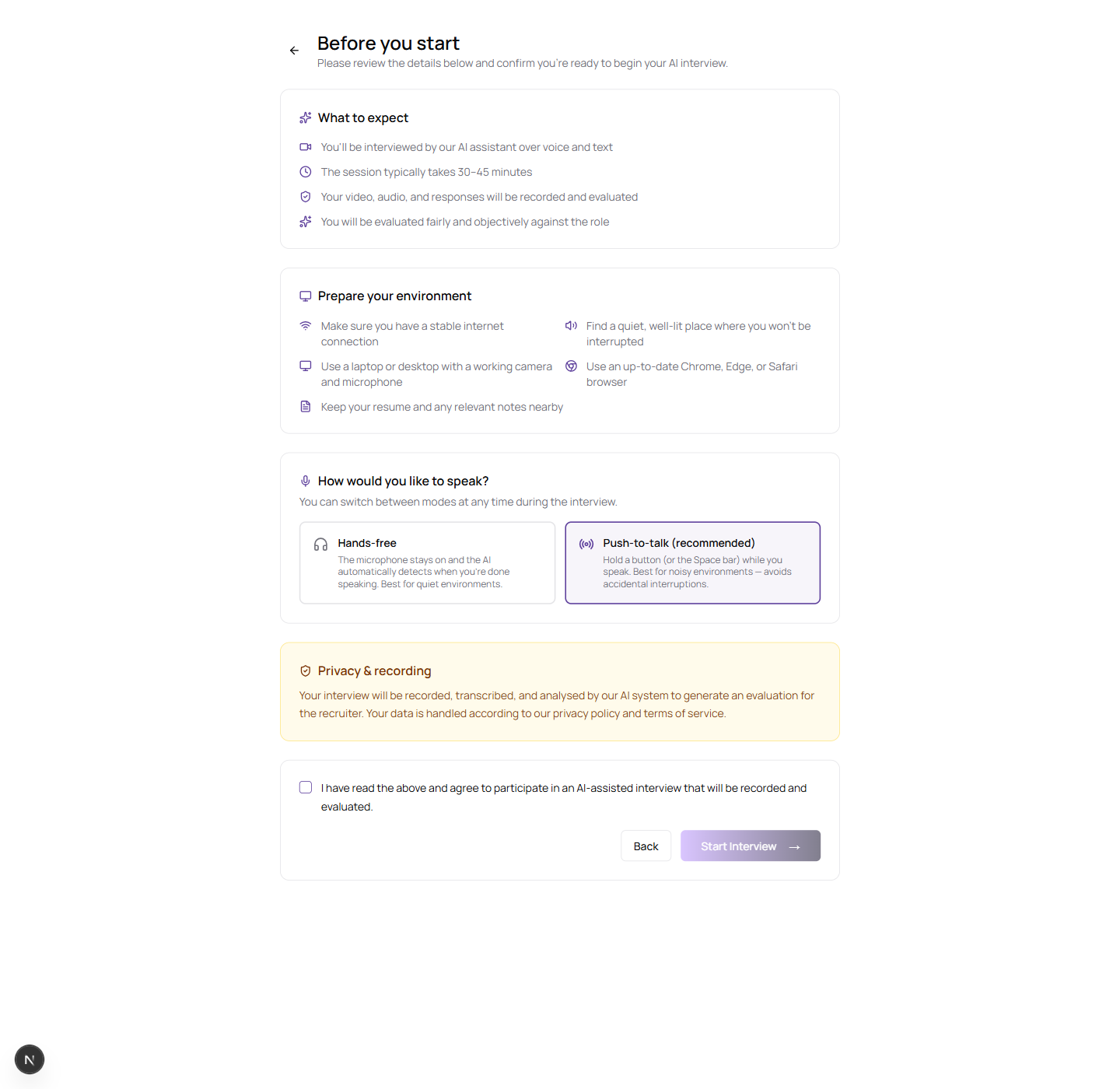
Full-screen consent step shown before the AI interview begins — with What to expect, Prepare your environment, input mode selector, and Privacy & recording sections
Push-to-Talk Interview Mode
A Better Option for Noisy Environments
Candidates can now pick between two input modes at the start of every AI interview:
| Mode | How It Works | Best For |
|---|---|---|
| Hands-free *(default)* | The mic stays on; the AI detects when you're done speaking | Quiet rooms, natural conversational flow |
| Push-to-Talk | Hold the Space bar (or a button) while you speak — release to send | Noisy environments, coffee shops, open offices |
What Else You Get in Push-to-Talk:
- A clear "Hold Space to speak" status message — no misleading *"Listening"* label
- The AI won't interrupt mid-sentence — a stray button-hold can't cut it off
- A small mode-switch icon inside the room so candidates can flip modes mid-interview
Why This Matters:
- The always-on microphone with semantic voice detection could false-trigger on background noise and cut the AI off
- Push-to-Talk removes that ambiguity — the candidate decides exactly when they're speaking
- Candidates who prefer to think through answers before committing now have a mode that fits
The mode selector appears on the pre-interview consent screen and defaults to Push-to-Talk (recommended) for the most reliable experience.
Per-Job AI Interview Behavior Settings
Tune Every Interview to Fit the Role
Every job's details page now has an AI Interview Behavior section letting recruiters configure exactly how the AI conducts interviews for that specific role.
What You Can Set Per Job:
| Setting | Options |
|---|---|
| Preferred Language | English, Arabic |
| Number of Questions | 1 – 10 (default 5) |
| Interviewer Personality | Conversational, Technical, Formal, Friendly |
| Follow-up Depth | Light, Moderate, Deep |
Why It Matters:
- Technical + Deep for senior engineering roles where the AI should probe on architecture
- Conversational + Light for entry-level or customer-facing roles where warmth matters more than depth
- Arabic for regional positions so candidates start in the right language from the very first word
- 1–3 questions for quick screening interviews, 7–10 for full-depth technical assessments
Changes take effect immediately for the next interview generated for that job.
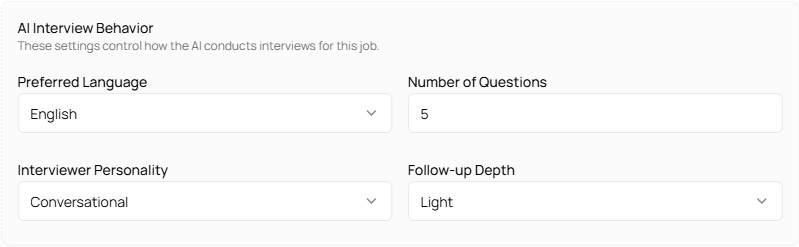
Per-job AI Interview Behavior section — preferred language, number of questions, interviewer personality, and follow-up depth
Redesigned Candidate Comparison
Compare Candidates Against the Job, Not Just Each Other
The Compare dialog has been rebuilt around the job description itself. Instead of a generic side-by-side with skill tags and red/green pass/fail colours, candidates are now scored against each required skill, each requirement, and each preferred qualification drawn directly from the JD — shown as a pricing-table-style checklist.
What You See Per Candidate:
- AI Match Score with a visual progress bar
- Required Skills — an explicit ✓ or dash for every skill listed on the job
- Requirements — coverage of each JD requirement line
- Preferred Qualifications — coverage of each "nice-to-have" line
- Shortlist / Reject action buttons at the bottom of every column
What Changed from Before:
| Before | Now |
|---|---|
| Criteria were AI-generated, not the actual JD | Criteria come directly from the JD you wrote |
| Skill tag chips cluttered the view | Skill tags removed |
| Red/green pass/fail colours | Clean check / dash indicators — neutral, readable |
| Generic side-by-side | Pricing-table style grid, columns per candidate, rows per criterion |
How It Works:
1. Click Compare in the applicants toolbar
2. Select 2 to 4 candidates
3. Click Compare (N) to open the new view
4. Scroll down the rows to compare coverage of each JD item
5. Shortlist or reject each candidate directly from the footer buttons
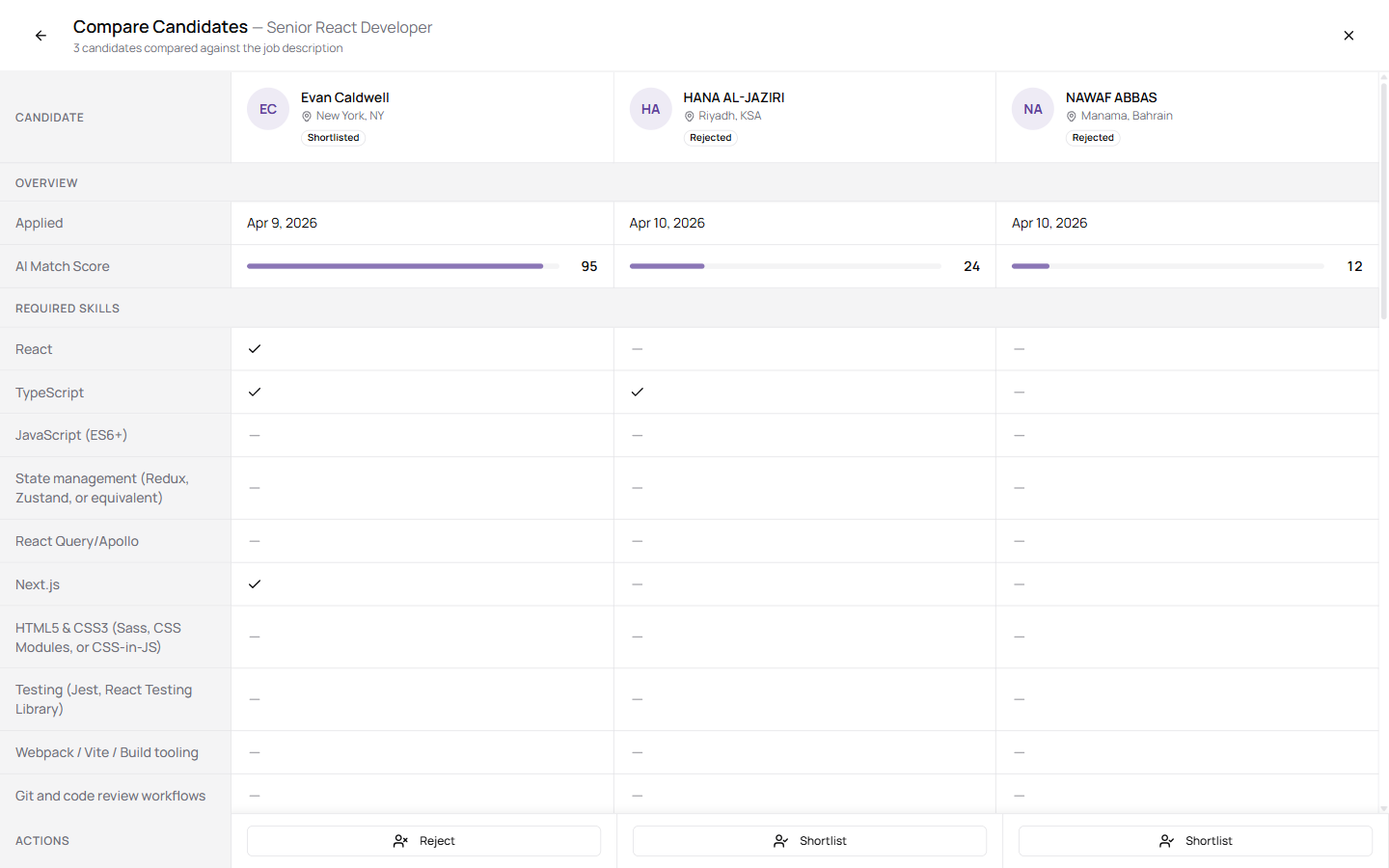
Side-by-side comparison of 3 candidates against the Senior React Developer JD — AI Match Score bars at the top, then Required Skills, Requirements, and Preferred Qualifications as rows
Sort Job Listings
Find the Right Job Faster
The Job Postings page now has a sort control with five options:
- Newest first (default)
- Oldest first
- Title (A–Z)
- Title (Z–A)
- Status
Sort is preserved as you switch between All Jobs, Open, and Closed tabs.
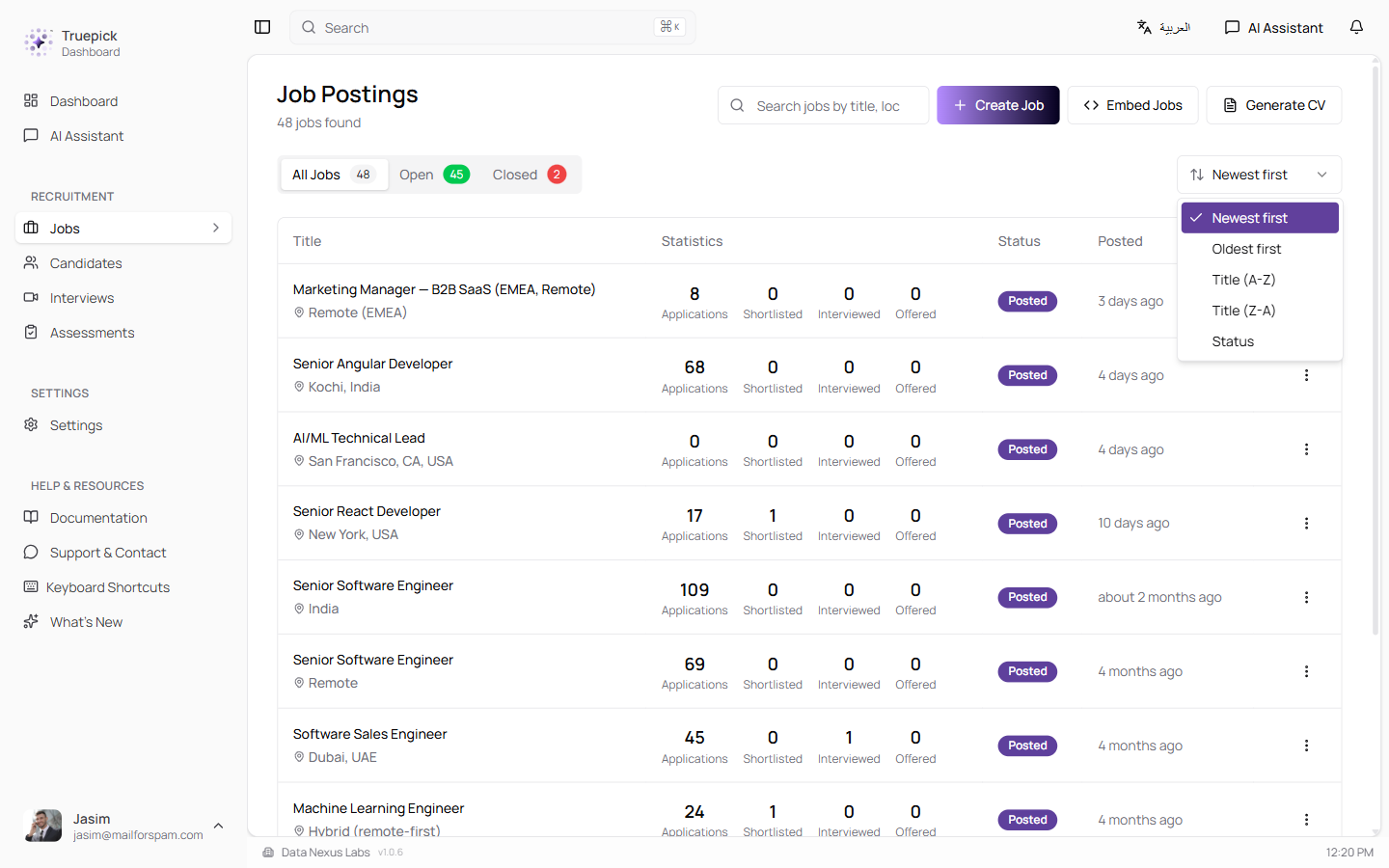
Jobs page with the new Sort by dropdown expanded
Re-Upload CV & Re-Evaluate (with History)
Keep an Applicant's Resume Current Without Losing the Original
Recruiters can now upload a new CV for an existing application — useful when a candidate sends an updated resume or when the initial upload was the wrong file. The system re-runs AI screening against the job, updates the match score, and archives the previous evaluation so you can see how the candidate's match has changed.
What Happens on Re-Upload:
1. The new CV is parsed and the candidate's profile (skills, experience, education) is replaced with the new content
2. The system automatically re-runs the AI review against the current job
3. The application's status is recomputed — a previously rejected candidate can become shortlisted, and vice versa
4. The previous evaluation is archived for the full audit trail
5. The row shows a "Re-evaluated N" pill under the score, and a "View history" option in the actions menu
Smart Guardrails:
| Guard | What It Catches |
|---|---|
| Identical-CV skip | Uploading the same CV again is detected instantly — no AI call, no wasted tokens |
| Identity check | If the new CV's email doesn't match the candidate, the upload is refused with a clear error |
| Transactional re-evaluation | Archive, re-score, status update, and profile replacement are one atomic operation — any failure rolls back cleanly |
| Row locking during re-evaluation | An amber background with "Re-evaluating..." badge; actions are locked until the server responds |
Full-Screen History Viewer:
- Side-by-side cards — current evaluation alongside every archived review
- Horizontal scroll with a pulsing arrow when there's more content to the right
- Each archived CV is downloadable from its history card
- Opens and closes with smooth animations
Reliable Post-Interview Analysis
Every Completed Interview Gets Scored
Previously, a handful of interviews would finish without triggering AI evaluation — usually when the room disconnected before the AI explicitly ended the session. The AI agent now reliably notifies the server before disconnecting, and analysis is triggered for every transcript that has content, including short or interrupted sessions.
Three Ways to End an Interview Gracefully
No More Stuck or Abruptly-Terminated Sessions
Interview sessions now end cleanly in any of three ways:
1. The AI ends naturally — when the interview has covered all questions, the AI wraps up with a farewell
2. The candidate asks to end — the AI confirms with the candidate first ("*Just to confirm, you'd like to end the interview now?*"), then delivers a full farewell before closing
3. The silence watchdog — if the candidate goes silent, the AI gently nudges at ~30 seconds, then delivers a farewell and closes at ~60 seconds
The closing sentences always finish cleanly — teardown waits for the AI to actually stop speaking before the room disconnects.
Single-Session Interview Enforcement
No More Duplicate Interview Sessions
A candidate clicking their interview link multiple times no longer spawns duplicate sessions. The system now enforces a single active session per application:
- First browser claims the session cleanly
- Second browser tab gets a polite *"interview in another window"* screen
- Reloading the page rejoins the same session instead of starting a new one
- Ended interviews sync across tabs — if you close the tab, all other tabs see the ended state
This prevents split transcripts, double-counted usage, and confusion over which recording is the real one.
Cleaner Live Interview Experience
Several Small Fixes That Add Up to a Much Better Feel
- AI greeting plays cleanly — the mic is muted until the greeting finishes, so phantom noise at startup can no longer race the greeting
- Transcript shows messages in the right order — a candidate's answer is no longer pushed below the AI's reply when the transcription finalises late
- Live bubble is clean — in-progress candidate speech renders inline as a quiet placeholder, without the old pulse animation, blinking cursor, or *"Transcribing"* label
- No more ghost bubbles — late transcription chunks for a finalised segment can't re-render the candidate's bubble during the AI's next reply
- Camera toggle removed — camera stays on for every interview (the previous toggle caused confusion)
Reading Scanned & Photo-Based CVs (OCR + Vision Fallback)
Even More Resilient CV Parsing
CV parsing now has a three-stage fallback chain that handles nearly any PDF you throw at it:
| Stage | What It Does |
|---|---|
| Text layer | Fast standard extraction — works for regular text-based PDFs and DOCX |
| OCR (Arabic + English) | Optical character recognition for scanned CVs and image-based PDFs |
| Vision model | AI-based reading for complex layouts and stylised resumes where OCR struggles |
This builds on the OCR work in 0.13 and closes the remaining edge cases where scanned resumes would return empty text. Verified on a real-world 26-CV batch — all 26 processed successfully, with 5 recovered specifically via the new OCR path.
Regenerate Interview Link — Now Actually Emails
Polished Regeneration Flow
The Regenerate Interview Link action now does what candidates expect:
1. Generates the new link
2. Sends the candidate an email with the new link (previously it silently updated without notifying)
3. Shows the sent timestamp (*"Invitation sent Apr 17, 3:42 PM"*) under the status badge so recruiters know the candidate has been informed
4. The whole flow — archive, status reset, email send — is transactional; any failure rolls back cleanly so you can retry from the same state
Safer Bulk Delete
Offered Candidates Are Protected
The bulk-delete action now hides and disables the selection checkbox for candidates who have been sent an offer letter, with a tooltip that explains why removal isn't allowed. Offered candidates are still visible in the list but can't be swept up in a mass action — protecting your hire records from accidental deletion.
Better Email Copy for Candidates
Clearer Language at Every Stage
Status emails to candidates got a small but meaningful rewrite:
| Stage | Before | Now |
|---|---|---|
| Offer decision | *"Moving forward"* | "Offer Extended" / "Congratulations" |
| Confirmation | Generic receipt | Application reference, job title, company, expected timeline, tracking link |
| After assessment pass | *(sometimes missed)* | Interview invitation auto-sent immediately |
Two silent bugs in the email pipeline were also fixed:
- Status change emails after assessment completion now fire reliably (previously missed in some paths)
- The offer-letter logo helper no longer crashes the whole status email flow
Security & Reliability
Making Truepick Safer and More Robust
Security:
- Signed magic tracking tokens — 64-char random tokens stored per application, validated server-side before any data loads, expire after 90 days, and can be revoked individually
- Rate-limited token generation — max 10 per application per hour, so compromised routes can't be abused
- CAPTCHA + email OTP on the guest apply endpoint to block spam and bots
- Privacy consent versioning — stored per application so consent records stay auditable as the notice evolves
- Single-session interview state prevents split transcripts and double billing
- Automatic cleanup of unverified pending applications
Reliability:
- Transactional CV re-evaluation — archive, re-score, status recompute, and profile replacement all or nothing
- Transactional interview-link regeneration — email send and DB updates commit together
- Post-interview analysis triggered for every transcript, including short or abandoned sessions
- Farewell drain holds teardown until the AI has actually stopped speaking, so closing sentences don't get cut off
- Cross-tab sync of interview-ended state via the browser's BroadcastChannel API
Released on April 18, 2026
View all releases